
Melvor Idle 2 Idle Combat Guide: Check Auto-Eat and Enemy Damage
Check Auto-Eat, enemy damage, special attacks, and supplies before committing to unattended combat in Melvor Idle 2.
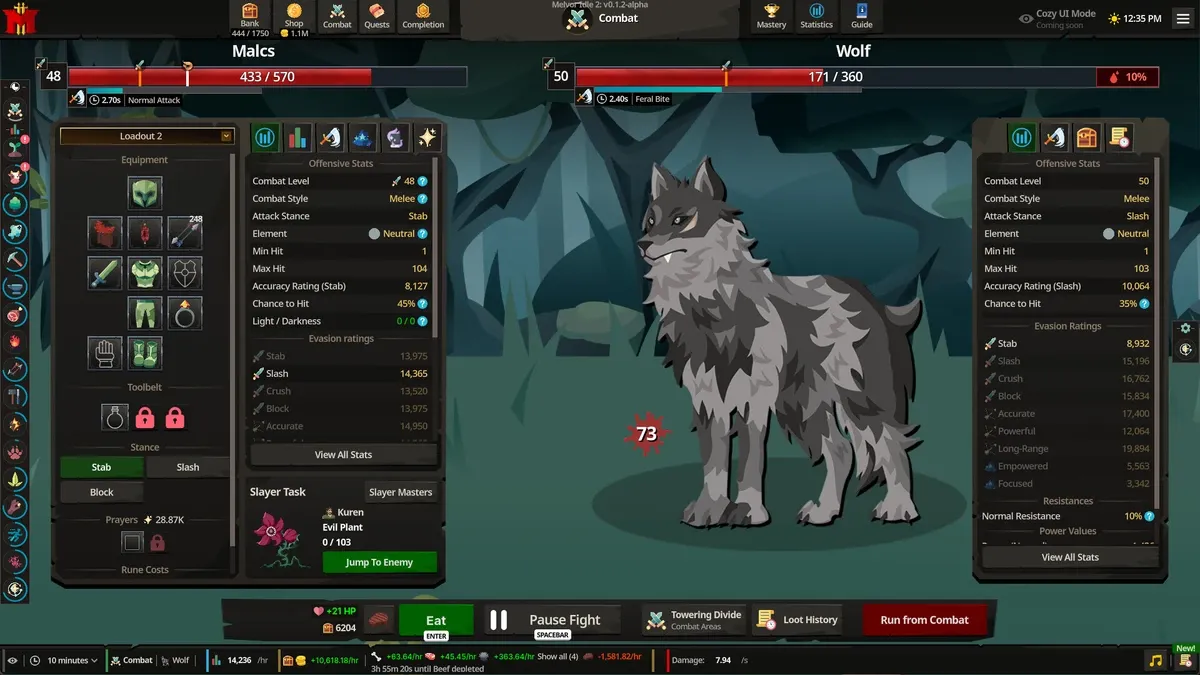
What does a safe first test look like?
Begin with the exact enemy, area and combat setup you plan to use when unattended. Confirm your actual loadout, select the food you want to consume, and watch enough turns to see how the fight behaves. Recheck after changing a weapon, armour piece, prayer or any buff the setup relies on.
| Check | What to record | When to stay online |
|---|---|---|
| Incoming damage | Live enemy stats, highest observed damage and special attack descriptions | A large hit or a sequence of hits can exhaust your remaining HP |
| Auto-Eat | Whether it is available, where it triggers and whether it worked in the test | You are relying on manual eating or the threshold is too close to enemy damage |
| Supplies | Food per minute, ammo or runes, and any buffs you depend on | Anything runs out before you plan to return |
| Staying power | Changes in armour, penalties and effects during the fight | A dangerous effect appears or armour degrades and damage increases |
How should you compare damage with Auto-Eat?
Read the displayed threshold in hitpoints. Think about the moment just before Auto-Eat would trigger: a dangerous hit must leave you alive for healing to help. Check the enemy’s special attacks and the tooltip that describes how armour can break before treating a small apparent gap as enough.
For example, if your trigger were 100 HP and an enemy could take 110 HP in one hit under the active setup, it could defeat you before Auto-Eat helps. If the ordinary hit appears lower, still check specials and effects that change the fight. This example explains the comparison; neither number is a universal game setting.
What does the Auto-Eat threshold actually tell you?
The threshold is the HP at or below which Auto-Eat can consume equipped food. Compare it against the largest credible hit under your current setup, including effects that can increase damage. A hit as large as the threshold leaves no practical margin. Check healing per food and the available stack separately. Melvor Idle 2 food mechanics
For a dungeon, record which wave used the most food and whether armour broke. Use the worst full test run, including the boss, to build a budget. If you needed to intervene even once, shorten the next test or adjust the setup and watch it again.
What should you check before logging out?
Use the amount of food spent during the supervised test to budget the session, then check other consumables independently. A long fight needs the weapon, ammunition or runes that the selected style actually uses. If the stock estimate or survival margin is uncertain, choose a less demanding fight or leave a non-combat action running instead.
If you are entering a dungeon, test the entire sequence under supervision first. The easiest early wave is a poor proxy for what happens at the boss. End the test if your remaining supplies or HP margin becomes uncomfortable and inspect the encounter that caused it.
- Confirm your active combat loadout
- Prepare a reserve of early combat food
- Read the first-dungeon checklist and waves
References
Developer’s Early Access combat and armour notes · Auto-Eat mechanics reference · Steam official combat screenshot.
Related Articles
combat
Melvor Idle 2 Quick-Equip Guide: Weapons and Loadouts
Find missing weapons in Melvor Idle 2’s Quick-Equip menu, filter by combat style, and use Tab to compare equipment against different loadouts.
dungeons
Melvor Idle 2 Hobgolbin Camp: First Dungeon Walkthrough
Unlock Hobgolbin Camp in Melvor Idle 2, follow all four waves, and prepare enough food and gear for a supervised first clear.
guides
Melvor Idle 2 Beginner Guide: What to Do First
Start Melvor Idle 2 with Act 1, turn quest requirements into a training plan, and pick a useful action before your first offline session.
Was this helpful?
Thanks for the feedback!