
Melvor Idle 2 Quick-Equip Guide: Weapons and Loadouts
Find missing weapons in Melvor Idle 2’s Quick-Equip menu, filter by combat style, and use Tab to compare equipment against different loadouts.
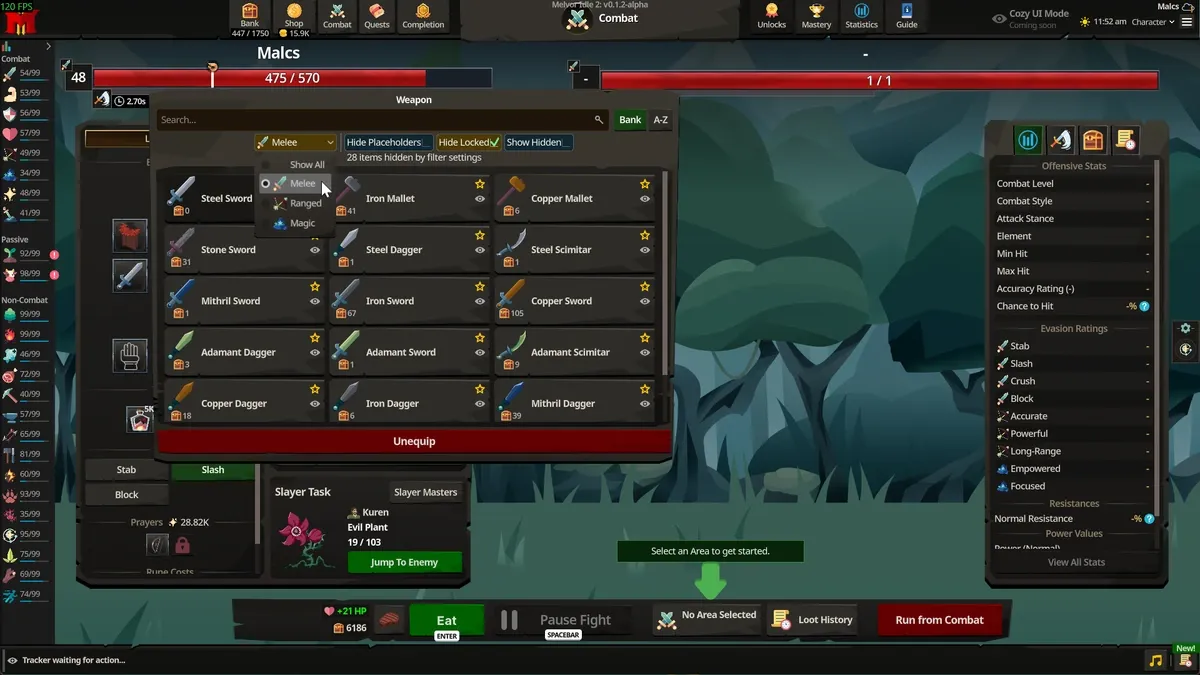
Why is a weapon missing from Quick-Equip?
The weapon menu may be showing only the style of the weapon you already have equipped. Open the combat weapon slot, inspect the style filter, then switch to the style you need or choose Show All. The launch notes say Show All opens by default when the weapon slot is empty.
- Go to Combat and open the weapon slot.
- Check whether a style is selected. If you are changing from melee to magic, open the filter and select Magic or Show All.
- Find the intended weapon and read its requirements. If it still does not appear, confirm you have the item and check whether you can equip it.
- Check the active loadout after equipping. If the fight uses supplies, verify they are ready before leaving combat to run.
What does pressing Tab change?
When you hover over equipment, its tooltip shows the item’s stats beside a comparison with one of your combat loadouts. Press Tab while that tooltip is open to cycle the comparison target. Read the loadout name before deciding which item to equip, especially when your melee and magic setups differ.
| Situation | What to look at |
|---|---|
| You found a weapon for another style | Change the weapon filter so that style is visible. |
| You are comparing an item for a backup setup | Cycle to that setup with Tab, then read its stats. |
| You are about to start a fight | Confirm the equipped weapon and the active loadout in Combat. |
What should you verify when switching from Melee to Ranged?
Choose the loadout you intend to use, open its weapon slot and change the filter to Ranged. Equip the bow and check the compatible ammunition on that same set. The Tab shortcut changes which set the tooltip compares against. Verify the active set in Combat separately before starting the fight. Developer’s equipment and filtering notes
For a quest such as Pointy Preparation, prepare this setup before the first attack so the entire encounter uses Ranged.
What should you test after changing your setup?
Do a short supervised fight against an encounter you already know. Watch how often you need food and whether you equipped the intended style. If the new setup consumes supplies too quickly or performs worse than expected, return to the loadout comparison before committing to a long session.
If you are still unlocking early systems, start with the beginner guide. If equipment is gated behind a skill milestone, use the Reach Level guide to plan that training.
Sources
- Developer’s Early Access patch notes, for the weapon filter, the Tab shortcut, and the Quick-Equip screenshot on the cover.
- More articles in the combat guide section.
Related Articles
combat
Melvor Idle 2 Idle Combat Guide: Check Auto-Eat and Enemy Damage
Check Auto-Eat, enemy damage, special attacks, and supplies before committing to unattended combat in Melvor Idle 2.
dungeons
Melvor Idle 2 Hobgolbin Camp: First Dungeon Walkthrough
Unlock Hobgolbin Camp in Melvor Idle 2, follow all four waves, and prepare enough food and gear for a supervised first clear.
guides
Melvor Idle 2 Beginner Guide: What to Do First
Start Melvor Idle 2 with Act 1, turn quest requirements into a training plan, and pick a useful action before your first offline session.
Was this helpful?
Thanks for the feedback!